



Video Training →Learn to Design Your Own Boards
Published by: BaDshaH on 14-03-2024, 14:46 |  0
0
Last updated 4/2020
Created by Robert Feranec
MP4 | Video: h264, 1280x720 | Audio: AAC, 44.1 KHz, 2 Ch
Genre: eLearning | Language: English + srt | Duration: 137 Lectures ( 14h 36m ) | Size: 4.8 GB
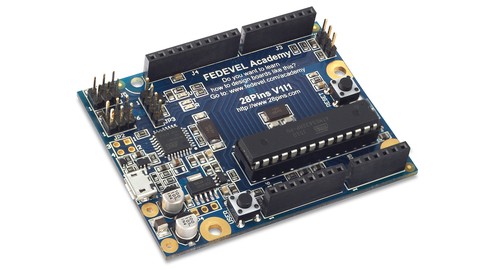
Design a board in 15 hours. Step-by-Step tutorial based on Arduino project (Altium)
What you'll learn:
After this course, you will design your own Arduino like board.
Requirements:
You will need Altium Designer software. If you are a college / university student, ask Altium for a student license. In many countries the student license is free.
Description:
Learning a basic board design is essential for everyone who would like to work in electronics or who would like to design electronic boards or products. Learning board design in the right software can open you door into many companies, help you to get a well paid job and can be used to design very complex and advanced boards.
Design a Real Board and Learn Essentials of Using Altium Designer
- Draw your own schematic- Route your PCB and do layout- Generate documentation needed to manufacture your PCB
Altium Designer is a Powerful Software
During this course you will learn how to use Altium Designer software. Altium Designer is a professional software used to design all kind of boards, from very simple ones to motherboards or servers. It is one of the most used software for electronic design. Learning Altium is useful for everyone planning or already working in electronics.
Contents and Overview
You will start with Arduino Uno reference schematic. You will learn how to re-draw the schematic, modify it, you will learn how to improve it and how to do PCB layout. The course videos are step-by-step and even if you are new in electronics or you have never used Altium Designer before, by repeating these steps, you will design your own board. By the end of this course, you will create all the necessary documents needed to manufacture the board.
Within 15 hours you will learn how to
- Draw schematic, including tips for component selection and important circuits- Create components, draw schematic symbols and footprints- Place components into your PCB- Route PCB and useful tips about layout- Create 3D model of your board- Create board variants with different components fitted / not fitted- Create Bill of Material (BOM)- Create assembly drawings showing position of components on the board- Generate Gerbers, Pick and Place, Drill file and other files needed for manufacturing- Prepare professional documents needed to manufacture your PCB and assemble your board- Bring your board to life, flash firmware and run a simple LED Blinky example
For everyone interested, the manufacturing documents created during this course can be used to build your board. Simply use PCB manufacturing data to get your PCB, buy components from Digikey and solder them by yourself.
Enjoy this course :)
Who this course is for:
College / University students: During this course you will learn how to work in Altium Designer. Altium is one of the most used software in companies which are designing electronic boards or products. Knowing how to work in Altium can give you an advantage when applying for a job. As a college / university student, you may be able to get a free license of Altium Designer.
Junior / Senior hardware design engineers: During this course you will go through complete process of designing an electronic board. You will learn all the steps exactly the way as they are done in a professional company. After this course you will know everything essential to use Altium Designer in your job. This course can be very useful when you are starting with Altium Designer or when you are moving to Altium Designer from a different CAD system.
Beginners, Hobbyists: If you build your own electronic circuits using wires or breadboards and you have ever wanted to transfer your circuits into a real board or real product, this course can help you. During this course you will learn how you can design your own boards.
Homepage
https://www.udemy.com/course/learn-to-design-your-own-boards/

https://rapidgator.net/file/f3e9607aa5f5a23a83adf105d0d7fed4
https://rapidgator.net/file/afe0cf126d55f6acc0fab879c6cf01c1
https://rapidgator.net/file/9a494899e6683e2af027eacd33f9d6f6
https://rapidgator.net/file/5546df8f0cae128b659988459c63bf91
https://rapidgator.net/file/1583415e8bc9fe1217290733ecd6aa3e
https://nitroflare.com/view/B065565F602122C
https://nitroflare.com/view/D392D4B720C91E4
https://nitroflare.com/view/E50A0E6787172B7
https://nitroflare.com/view/BE4AB715FD7EC2C
https://nitroflare.com/view/798CACF49909CFD
https://ddownload.com/a92h8i4xy63y
https://ddownload.com/m101so5pkk6n
https://ddownload.com/byv5fu3dg2j8
https://ddownload.com/a8uvof8yzvwy
https://ddownload.com/ubfdg9ly1ru0
Related News
-
{related-news}