



Software / For MacOSX →Typinator 8.11 Multilingual macOS
Published by: LeeAndro on 14-12-2021, 16:31 |  0
0
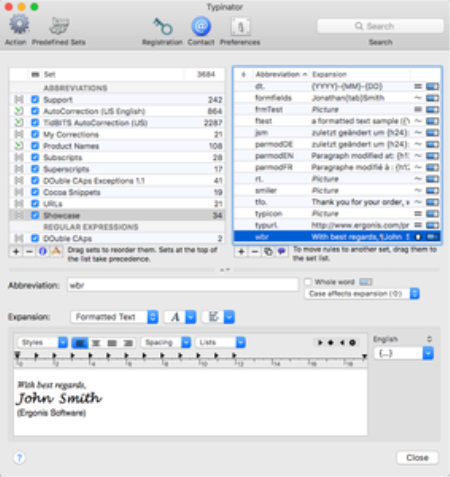
Typinator 8.11 Multilingual macOS | 9.7 MB
Languages: English, Deutsch, Franais
Have you ever experienced the tedium and frustration of having to repeatedly type your name, e-mail address, home page url, or other words or phrases again, again and again
Do you frequently need to quickly insert images like your signature, location plan, or company logo into documents Do you often misspell words when typing Typinator boosts your productivity by automating the process of inserting frequently used text and graphics and auto-correcting typing errors.
With thousands of predefined corrections for common typos and misspelled words for US and British English, German and French, Typinator is not only a typing assistant that speeds repetitive typing tasks, but also a system-wide auto-correction tool that automatically fixes typing errors and misspelled words.
Setup is easy: You just define an abbreviation along with its replacement text or picture.
Usage is even easier: Whenever you type one of your abbreviations in any application, Typinator inserts the corresponding replacement.
Words cannot describe the huge benefits Typinator offers to you. Get an impression how Typinator can boost your productivity and save you a lot of in only three minutes by watching our short and sweet product videos:
Typinator 8 comes with a long list of new features and improvements, which make Typinator 8 the best text expander ever.
Typinator 8 offers a new statistics mode, where you can see the usage counts for abbreviations and sets, and how long ago an abbreviation has been used most recently. You can also sort your snippets by these values, to see which abbreviations you are using frequently and which ones you may have forgotten about.
Another great new feature of Typinator 8 are Magic Keys. You can now use the modifier keys Shift, Control, Option, and Command in abbreviations, as if they were real characters. This allows you to use them as special trigger characters and offers a simple way to avoid conflicts in abbreviations.
A very slick user interface enhancement is the new "mini menu bar" right above the expansion field, where you can find all markers and editing functions in one central place. A nice side-effect of this improvement is that the expansion field is now wider and you have more space to enter your expansions.
New is also the integration with
. With PopChar installed, you can now use Typinator to search for and insert arbitrary Unicode characters by their name or Unicode number. In combination with a hotkey for Typinator's quick search, this is a great way to type arbitrary Unicode characters without taking your hands off the keyboard.
DOWNLOAD
uploadgig.com
rapidgator.net
nitro.download
Related News
-
{related-news}