



For MacOSX → Cocktail Monterey Edition 15.2 macOS
Published by: voska89 on 27-12-2021, 05:13 |  0
0
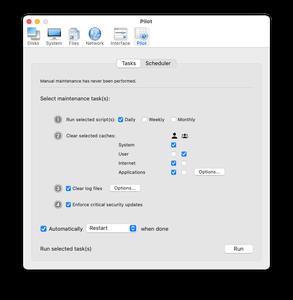
Cocktail Monterey Edition 15.2 macOS | 2.9 MB
Cocktail is a general purpose utility for macOS that lets you clean, repair and optimize your Mac. It is a powerful digital toolset that helps hundreds of thousands of Mac users around the world get the most out of their computers every day. The application serves up a perfect mix of maintenance tools and tweaks, all accessible through a clean and easy to use interface.
Video Training → Linkedin - Photos for macOS Monterey and iPhone Essential Training
Published by: voska89 on 9-12-2021, 00:05 | 0

Duration: 1h 17m | .MP4 1280x720, 30 fps(r) | AAC, 48000 Hz, 2ch | 1.14 GB
Genre: eLearning | Language: English
With the free Photos for macOS software from Apple, you can manage, enhance, and share photos in a variety of ways. In this course, photographer, author, and educator Derrick Story takes you on a detailed exploration of Photos for macOS. Derrick gives you a tour of the interface and the headline new features, then goes into detail on the ways you can use Live Text to transform your camera into your personal assistant. He shows you how to search for pictures by object type, copy images from messages to Photos, use Quick Notes with Photos, and automate common tasks with shortcuts. Derrick walks you through the improved importing process and gives you some useful tips on organizing and editing your pictures directly in Photos. Plus, he shows you where to find more tips and techniques for working with Photos for macOS.
Video Training → Linkedin Learning - macOS Monterey Essential Training
Published by: Minhchick on 23-11-2021, 04:54 | 0
Linkedin Learning - macOS Monterey Essential Training-XQZT
English | Size: 938.63 MB
Category: Tutorial
Discover everything you need to know about working with the latest operating system from Apple
Video Training → Udemy - The Guide to macOS Monterey
Published by: voska89 on 15-11-2021, 13:38 | 0

MP4 | Video: h264, 1280x720 | Audio: AAC, 44.1 KHz, 2 Ch
Genre: eLearning | Language: English + srt | Duration: 75 lectures (7h 20m) | Size: 3.23 GB
Learn How to Use Your Mac
Video Training → Linkedin - macOS Monterey Essential Training
Published by: voska89 on 15-11-2021, 12:58 | 0

MP4 | Video: h264, 1280x720 | Audio: AAC, 44.1 KHz, 2 Ch
Skill Level: Beginner + Intermediate | Genre: eLearning | Language: English + srt | Duration: 4h 11m | Size: 903.1 MB
If you are buying a new Mac, upgrading your current Mac, or migrating from Windows, you'll need to know the ins and outs of the latest operating system from Apple. Instructor Nick Brazzi starts with the basics: AppleID and iCloud accounts, doing the first-time setup of a new computer, configuring system preferences and user accounts. Nick explains how to connect accessories, use keyboard shortcuts, and connect to the internet. Then he dives into the many ways you can use Finder, your Mac's equivalent of a very easily searchable filing cabinet. Nick covers how to organize items on your desktop and customize the desktop wallpaper. After stepping you through ways to launch and use applications, he presents the information you need to install, update, and manage applications.

For MacOSX → macOS Monterey 12.0 (21A5284e) Beta 3
Published by: voska89 on 24-07-2021, 14:07 | 0
macOS Monterey 12.0 (21A5284e) Beta 3 | File Size: 10.9 GB
Apple previewed macOS Monterey, the latest version of the world's most advanced desktop operating system. macOS Monterey comes with new ways for users to connect, get more done, and work more fluidly across their Apple devices.
SharePlay, a new feature in FaceTime, lets users share experiences together, and Shared with You makes it easy to discover and enjoy content shared through Messages right in Photos, Safari, Apple Podcasts, Apple News, and the Apple TV app. A major update to Safari features a gorgeous streamlined tab bar and powerful tab organization with Tab Groups, Shortcuts comes to the Mac to automate everyday tasks, and Focus helps users stay on task and reduce distractions. Additionally, Universal Control and AirPlay to Mac are new Continuity features that offer more ways to work effortlessly across Apple devices. macOS Monterey will support the broadest lineup of Macs in history, including the latest iMac, MacBook Air, 13-inch MacBook Pro, and Mac mini, as well as Apple's Intel-based Macs.

