



Portable → Drive SnapShot 1.49.0.18947 + Portable
Published by: voska89 on 25-08-2021, 15:37 |  0
0

Drive SnapShot 1.49.0.18947 + Portable (x64 1.49.0.18948 Portable) | 6.8 Mb
Drive Snapshot creates an exact Disk Image of your system into a file, including the operating system, installed programs, your data and all security attributes - while windows is running and you continue to work. Drive Snapshot it allows you to backup your partition or your hard disk drive and it also can create a disk image of your system. If disaster strikes (a virus, trojan, or hard disk crash), a complete and exact restauration of your system will be possible in only few minutes. The image file can be mounted as a virtual drive, so you can easily restore (or use) single files or directories, using the Windows Explorer, or other program.
Video Training → Skillshare - Google Drive - 9 Amazing Tips & Tricks to become a Drive Genius
Published by: voska89 on 12-08-2021, 13:50 | 0

MP4 | Video: h264, 1280x720 | Audio: AAC, 44.1 KHz
Language: English | Size: 504 MB | Duration: 33m
Hi there! Welcome to my Google Drive 2021 Tips & Tricks course. My name is Kevin O'Brien and I'll be your Drive Coach! Learn to become a Drive Genius with these 9 tips & tricks to help your productivity
Portable → Drive SnapShot 1.48.0.18930 + Portable
Published by: voska89 on 29-07-2021, 10:30 | 0

Drive SnapShot 1.48.0.18930 + Portable (x64 1.48.0.18929 Portable) | 6.8 Mb
Drive Snapshot creates an exact Disk Image of your system into a file, including the operating system, installed programs, your data and all security attributes - while windows is running and you continue to work. Drive Snapshot it allows you to backup your partition or your hard disk drive and it also can create a disk image of your system. If disaster strikes (a virus, trojan, or hard disk crash), a complete and exact restauration of your system will be possible in only few minutes. The image file can be mounted as a virtual drive, so you can easily restore (or use) single files or directories, using the Windows Explorer, or other program.
Video Training → Udemy - 5G Drive Test Troubleshooting
Published by: voska89 on 17-07-2021, 17:01 | 0

MP4 | Video: h264, 1280x720 | Audio: AAC, 44.1 KHz, 2 Ch
Genre: eLearning | Language: English + srt | Duration: 6 lectures (2h 6m) | Size: 823.4 MB
Introduction to 5G Drive Test and Troubleshooting
Portable → TeraByte Drive Image Backup & Restore Suite 3.46 Portable
Published by: voska89 on 6-07-2021, 17:03 | 0
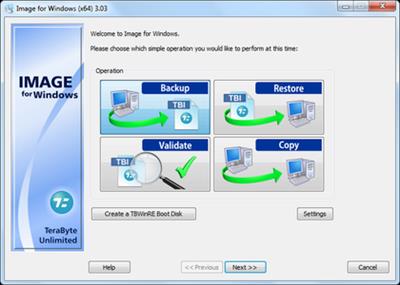
TeraByte Drive Image Backup & Restore Suite 3.46 (x64) Portable | 154.5 MB
Image for Windows provides an easy and convenient way to completely backup all your hard drive's data, programs and operating systems. Your backups can be saved directly to external USB and FireWire™ drives, to internal or network drives, and even directly to CD, DVD, or BD. The suite includes an easy-to-use MakeDisk wizard for creating a recovery boot disk. To restore your data, programs and operating systems back to the way they were when the backup was created, simply boot the recovery disk and restore the partition(s) or drive(s) you need to recover. It's that easy.
Portable → Drive SnapShot 1.48.0.18910 + Portable
Published by: voska89 on 2-07-2021, 13:50 | 0

Drive SnapShot 1.48.0.18910 + Portable (x64 1.48.0.18911 Portable) | 6.8 Mb
Drive Snapshot creates an exact Disk Image of your system into a file, including the operating system, installed programs, your data and all security attributes - while windows is running and you continue to work. Drive Snapshot it allows you to backup your partition or your hard disk drive and it also can create a disk image of your system. If disaster strikes (a virus, trojan, or hard disk crash), a complete and exact restauration of your system will be possible in only few minutes. The image file can be mounted as a virtual drive, so you can easily restore (or use) single files or directories, using the Windows Explorer, or other program.
Software → Micromat Drive Scope 1.2.13 Multilingual
Published by: voska89 on 2-06-2021, 20:27 | 0

Micromat Drive Scope 1.2.13 Multilingual macOS | 24.5 Mb
Hard drives (and solid state drives) are the most failure prone components in your Mac. For that very reason, in fact, drive manufacturers have built in self monitoring, analysis and reporting technology right into the drive. (a.k.a. SMART) Most utilities barely scratch the surface of this information, simply reporting the bare essentials: pass or fail. Too often, once the overall failure has occurred, there isn't enough time to get important data from the drive. With Drive Scope you can see into the health of most any drive connected to your Mac.
Software → Drive SnapShot 1.48.0.18904
Published by: BaDshaH on 2-06-2021, 12:46 | 0
File size: 6.0 MB
Drive Snapshot creates an exact Disk Image of your system into a file, including the operating system, installed programs, your data and all security attributes - while windows is running and you continue to work. Drive Snapshot it allows you to backup your partition or your hard disk drive and it also can create a disk image of your system. If disaster strikes (a virus, trojan, or hard disk crash), a complete and exact restauration of your system will be possible in only few minutes. The image file can be mounted as a virtual drive, so you can easily restore (or use) single files or directories, using the Windows Explorer, or other program.
Portable → Drive SnapShot 1.48.0.18894 + Portable
Published by: voska89 on 1-06-2021, 00:39 | 0

Drive SnapShot 1.48.0.18894 + Portable (x64 1.48.0.18895 Portable) | 6.8 Mb
Drive Snapshot creates an exact Disk Image of your system into a file, including the operating system, installed programs, your data and all security attributes - while windows is running and you continue to work. Drive Snapshot it allows you to backup your partition or your hard disk drive and it also can create a disk image of your system. If disaster strikes (a virus, trojan, or hard disk crash), a complete and exact restauration of your system will be possible in only few minutes. The image file can be mounted as a virtual drive, so you can easily restore (or use) single files or directories, using the Windows Explorer, or other program.
Portable → Drive SnapShot 1.48.0.18891 + Portable
Published by: voska89 on 1-06-2021, 00:39 | 0

Drive SnapShot 1.48.0.18891 + Portable (x64 1.48.0.18892 Portable) | 6.8 Mb
Drive Snapshot creates an exact Disk Image of your system into a file, including the operating system, installed programs, your data and all security attributes - while windows is running and you continue to work. Drive Snapshot it allows you to backup your partition or your hard disk drive and it also can create a disk image of your system. If disaster strikes (a virus, trojan, or hard disk crash), a complete and exact restauration of your system will be possible in only few minutes. The image file can be mounted as a virtual drive, so you can easily restore (or use) single files or directories, using the Windows Explorer, or other program.

