



Video Training → Create Authentic Mixed Media Art Journal Pages In Procreate
Published by: voska89 on 26-12-2022, 15:24 |  0
0
Published 12/2022
MP4 | Video: h264, 1280x720 | Audio: AAC, 44.1 KHz
Language: English | Size: 1.27 GB | Duration: 1h 0m
Instructions for Painting and Using Specialty Markers with 20 Brushes Included
What you'll learn
Learn my step-by-step method for creating interesting and textural backgrounds
Learn tips for creating an interesting composition
Learn workflow for use of layers and other great features like blending modes
Learn methods for keeping the art fully editable for later adjustments and re-coloring using layers
Requirements
Procreate experience is an asset but not a pre-requisite
Description
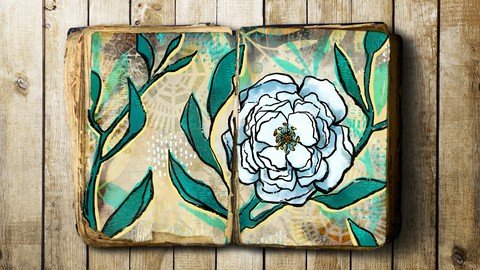
I have spoken about a "Daily Art Practice" before, and I wanted to give you another experience with mixed media art in Procreate. This class, Create an Authentic Art Journal Page in Procreate, was a class I created just after having major surgery, and I swear it helped me recover more quickly. I personally find that painting and drawing are great stress relievers. And when it is digital art you're creating, you will never run out if supplies and traditional materials! You can literally be producing this art anywhere and when you are done, just close your iPad. No fuss. No muss. It is a great place to experiment with new techniques and materials too, without breaking the bank. Spending a little money on brushes is far less expensive than visiting the art store for materials, supplies and tools! (Download the class resources here).If you are new to mixed media in Procreate, focus on the process, rather than the final result. Don't limit your creativity because drawing lines, mark making, inking and painting all contribute to your final piece. I want to encourage you to enjoy your "me" time and have fun! Play! It is all a part of your development.If you find the blank screen more/as intimidating as the blank page, take the time to just fill a few documents with textural backgrounds first. I am providing you with brushes to make that "start" easier. Also, be sure to check out the free resources I offer on my website or have given away in previous classes.This class is a beginner to intermediate class for people who have been using the Procreate app on their iPad with an Apple Pencil for a bit. This class focuses on creating digital art rather than how to art journal (for now – other classes coming soon!). You'll be making your own digital art journal pages using the lessons from this class in the future.This class, Create an Authentic Art Journal Page in Procreate, will show you some of my illustration methodology as you follow me step-by-step through the process of everything from the bottom up. The background is just the beginning. And, I encourage you throughout to try to make this art uniquely you. That can be accomplished using alternate colors schemes, different brushes, and experiments with textures and layering. That was one of my main goals as I put this class together. I can see many follow up classes in the future to compliment this!In this class I'll walk you through:· my step-by-step method for creating interesting and textural backgrounds· tips for creating an interesting composition· my workflow for use of layers and other great features like blending modes· methods for keeping the art fully editable for later adjustments and recoloring using layersI know you will be chomping at the bit to create more when you realize this project it so fun and easy. I know will be able to really put your personality into it. I provide several pattern brushes you can use for your backgrounds too, and you can, of course, use one of your own brushes and patterns created in previous classes. I can't wait to see the diversity that will surely come from this!The key concepts I will include:· layering to create great textural effects· a look highlights and shadows and other methods to make the foreground stand out against the background· approaches you can take to make this design your ownAs you develop as an illustrator, you will find that challenging yourself is so satisfying! Learning new Procreate workflows is always desirable. I know you will create something very tactile and organic. Maybe you will think of many other ideas beyond what I have done in class. Be sure to really take a close look at reference!Intro to Art Journal Pages in ProcreateThis short intro will give you an overview of the class.Lesson 1: Overview, Set Up and Base LayerIn this lesson, I will give an overview of the techniques we are trying to achieve. Once we have looked at a bunch of inspiration, we will begin setting up our base layers. I provide the color palette which you can download; once you double click on it, it will automatically open in Procreate. You will also receive an overview of some of the brushes I have included, and I show you the use of blending modes.Lesson 2: Setting Up the Line ArtIn this lesson, I will break down the complete process of inking the flowers, starting first with a rough sketch. Throughput the lesson I speak to the style of this piece which is very loose and casual. I suggest looking at the work of Marilou Cadiz-Marshall (MCM Voila) for inspiration.Lesson 3: Adding Main Color AreasIn this lesson, I will explain the settings and sizing of the brushes in relation to the look we are trying to achieve. I will show you some of the key techniques I use and explain every step of the way. By the end of the lesson, you will have mostly filled in the colors on the flower and leaves. I explain how the specialty brush I am using can be used for shading and dimension.Lesson 4: Textural Paints, Accents and Fills AreasThis is the lesson in which I teach you about adding textural finishes in the background with the specialty brushes I am providing. Little by little we are progressing to the finish line!Lesson 5: Details and FinishingDetails. Details. Details! This lesson shows you a bunch of the things I think about and do when finalizing an artwork like this. I couldn't have told you or predicted exactly what I was going to do. The whole process is very intuition-based. The more of these you do, the easier they will become!Lesson 6: Timelapses, Reviews and MockupsFor this lesson, I will debrief you on the three artworks I produced in this style, in preparation for the lessons. Looking at these in timelapse form gives you a whole new perspective and I show you a couple of the techniques for adding interest that we didn't cover in class. At the end of the lesson, I also show you several mockups I felt really showcased the art.Lesson 7: Closing Thoughts and Wrap UpWe will conclude everything in this lesson, and we end with a chat about next steps.Concepts covered:Concepts covered include but are not limited to Procreate floral illustration, inking styles, layering, transparency, layer blending modes, Procreate ephemera brush stamps, Procreate canvas settings, the Brush Studio in Procreate, adjusting Procreate grain brushes, sizing of documents and brushes, adding texture with brushes, procreate brushes for adding other interesting details, workflow best practices, painting best practice, Procreate composites, techniques with paints and blending, mixed media art journal techniques in Procreate, and much more.You will get .· 1 hour of direction from an instructor who has been in graphic design business and education for over 40 years· knowledge of multiple ways to solve each design challenge· an outline you can print off and a set of assets you can download in my Artist Resources of my websiteProject DescriptionFor today's project, I'd love to see what you can do with the ideas I give you in class. Play around and experiment and plan on doing more than one layout. Start with tactile and organic backgrounds. You can even go ahead and do two or three backgrounds before starting with the foregrounds. When you are ready, create a rough sketch to guide you. Experiment and have fun with it. This is supposed to be relaxing and therapeutic. I can't wait to see what you produce.
Overview
Section 1: Introduction
Lecture 1 Overview, Set Up and Base Layer
Lecture 2 Setting Up the Line Art
Lecture 3 Adding Main Color Areas
Lecture 4 Textural Paints, Accents and Fills Areas
Lecture 5 Details and Finishing
Lecture 6 Timelapses, Reviews and Mockups
Lecture 7 Closing Thoughts and Wrap Up
Those who wish to develop as an illustrator! Learning new Procreate workflows is always desirable. I know you will create something very tactile and organic
Homepage
https://www.udemy.com/course/create-authentic-mixed-media-art-journal-pages-in-procreate/Buy Premium From My Links To Get Resumable Support,Max Speed & Support Me
Download From 1DL
https://1dl.net/gpo68q2zdb9u/eurxa.Create.Authentic.Mixed.Media.Art.Journal.Pages.In.Procreate.part1.rar
https://1dl.net/wgqmdozsqog9/eurxa.Create.Authentic.Mixed.Media.Art.Journal.Pages.In.Procreate.part2.rar

https://rapidgator.net/file/59e27fb6765dc32d67ea9aa6ba487944/eurxa.Create.Authentic.Mixed.Media.Art.Journal.Pages.In.Procreate.part2.rar.html
https://rapidgator.net/file/e0e842f06b78d595fdaf617b1cd3a40e/eurxa.Create.Authentic.Mixed.Media.Art.Journal.Pages.In.Procreate.part1.rar.html

https://uploadgig.com/file/download/2a84db33C478B629/eurxa.Create.Authentic.Mixed.Media.Art.Journal.Pages.In.Procreate.part1.rar
https://uploadgig.com/file/download/505A653620c1fca2/eurxa.Create.Authentic.Mixed.Media.Art.Journal.Pages.In.Procreate.part2.rar

https://nitroflare.com/view/67295A9C46872AC/eurxa.Create.Authentic.Mixed.Media.Art.Journal.Pages.In.Procreate.part1.rar
https://nitroflare.com/view/E00F6F906262ACC/eurxa.Create.Authentic.Mixed.Media.Art.Journal.Pages.In.Procreate.part2.rar
Links are Interchangeable - No Password - Single Extraction
Video Training → Linkedin - How to Be More Authentic and Creative on Video
Published by: voska89 on 11-11-2022, 11:27 | 0

Released 09/2022
MP4 | Video: h264, 1280x720 | Audio: AAC, 44.1 KHz, 2 Ch
Skill Level: General | Genre: eLearning | Language: English + srt | Duration: 51m | Size: 631.9 MB
The modern workforce has changed drastically. You're probably finding yourself staring at your coworkers through a screen more often than you once did. It's tough to overcome your discomfort as you struggle to authentically communicate due to your professionalism and originality being compromised by a camera. But in this course, creativity and productivity expert Samantha Bennett shows you tools to help you achieve exactly that. Sam starts by sharing why the vapid nature of video calls is unnatural, and provides strategies for how to bring your authentic, creative self to virtual world events. She then provides you with insights for how to creatively showcase yourself in this new, online world. She shows you how to hype yourself up, create the best setting to deliver your message, and how you can prepare to shine in virtual meetings. Also learn how to recover if you face technical difficulties and reflect and stay connected with others after events wrap up.
Video Training → Masterclass President George W Bush Teaches Authentic Leadership
Published by: Minhchick on 6-09-2022, 19:00 | 0
Masterclass President George W Bush Teaches Authentic Leadership-10000HOURS
English | Tutorial | Size: 7.79 GB
Learn to listen and inspire a culture of teamwork. The 43rd U.S. president teaches leadership skills from his career and opens up about painting
Video Training → MasterClass - Teaches Authentic Leadership with President George W. Bush
Published by: voska89 on 20-08-2022, 09:05 | 0
Released 08/2022
MP4 | Video: h264, 1920x1080 | Audio: AAC, 44.1 KHz, 2 Ch
Genre: eLearning | Language: English + srt | Duration: 12 Lessons (3h) | Size: 8 GB
Learn to listen and inspire a culture of teamwork. The 43rd U.S. president teaches leadership skills from his career and opens up about painting
Video Training → Udemy - Authentic Italian Cooking
Published by: voska89 on 22-07-2022, 07:46 | 0
Last updated 5/2020
MP4 | Video: h264, 1280x720 | Audio: AAC, 44.1 KHz
Language: English | Size: 2.15 GB | Duration: 1h 42m
Video Training → Writing Authentic Fiction How to Build a Believable Character
Published by: voska89 on 18-07-2022, 08:37 | 0
Duration: 32m | Video: .MP4, 1280x720, 30 fps | Audio: AAC, 48 kHz, 2ch | Size: 222 MB
Genre: eLearning | Language: English
Want to write compelling fiction? The secret is creating authentic characters.Join best-selling author Sabaa Tahir as she walks you through her personal process for crafting authentic characters! Packed with exercises, prompts, and tried-and-true techniques, this class will teach you how to create real and nuanced characters that feel like they could walk right off of the page. Once you master this, you'll be on your way to becoming the storyteller you've always dreamt of being. You'll learn how to:Define the goal, motivation, and conflict to set the groundwork for your character
Determine key attributes to build your character
Video Training → Authentic Japanese Home Cooking Growing Library Of Recipes
Published by: voska89 on 15-07-2022, 09:59 | 0
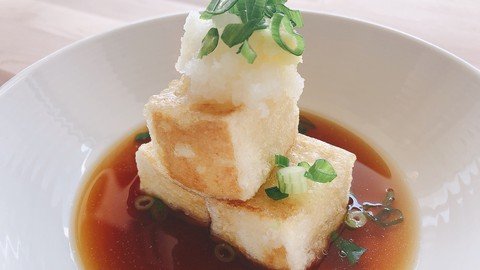
Last updated 9/2021
MP4 | Video: h264, 1280x720 | Audio: AAC, 44.1 KHz
Language: English | Size: 1.09 GB | Duration: 0h 55m
Learn how to make everything from traditional Japanese recipes to modern fusion style dishes - at home!
Video Training → Design an Authentic Victorian Monogram ~ in Adobe Illustrator
Published by: voska89 on 17-06-2022, 17:43 | 0
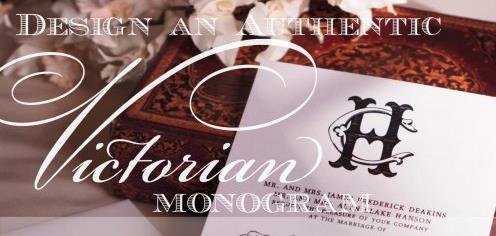
Design an Authentic Victorian Monogram ~ in Adobe Illustrator
Home Page https://www.skillshare.com/classes/Design-an-Authentic-Victorian-Monogram-in-Adobe-Illustrator/533564863
Genre / Category:
Drawing and Painting & ArtFile Size :1.3GB
Product Details
With the popularity of recent royal weddings and lush period dramas, we've been experiencing a radical swing in online wedding invitation trends, and one of the most frequent design requests I've been receiving is for a Victorian monogram.
Software → Altova Authentic 2022 rel.2 Enterprise
Published by: voska89 on 6-05-2022, 15:10 | 0

Altova Authentic 2022 rel.2 Enterprise | 108.2 mb
Altova announced the release of Authentic 2022 rel.2. This update added support for images in the Project Window. Now, when Projects include image files, mousing-over will generate a preview. Images can also be opened for editing in other apps directly from the Project Window.
Video Training → YouTube Success - Creating an Authentic Channel with Engaging Videos
Published by: voska89 on 15-01-2022, 09:24 | 0
Duration: 1h 29m | Video: .MP4, 1280x720, 30 fps | Audio: AAC, 48 kHz, 2ch | Size: 950 MB
Genre: eLearning | Language: English

